
This article is part of our collection at Banana Prompts, where you can explore high-quality Nano Banana prompts.
1. Visual Math & Handwriting (The Reasoning Solver)
This trick leverages the model's multimodal logic capabilities to perform tasks that seem boring but are revolutionary: visual math solving and handwriting mimicry. Nano Banana Pro can "see" an image of a handwritten math problem, solve it using its internal Gemini reasoning engine, and then generate an image of the solution that mimics the handwriting style of the input. It is performing symbolic logic and then rendering the result.
The Mechanism: Multimodal Reasoning Loop
The process involves three steps:
- Vision Encoder: The model scans the input image and transcribes the handwritten text (e.g., "Integrate x^2 dx") into tokens.
- Reasoning Core: The Gemini 3 LLM solves the problem (Result: "x^3/3 + C").
- Image Decoder: The model generates a new image containing the solution, conditioned on the "style tokens" of the original handwriting (e.g., messy blue ballpoint pen on lined paper).
The Trick: The "Mimicry & Solve" Prompt
The prompt must instruct the model to both perform the logical task and the aesthetic task simultaneously.
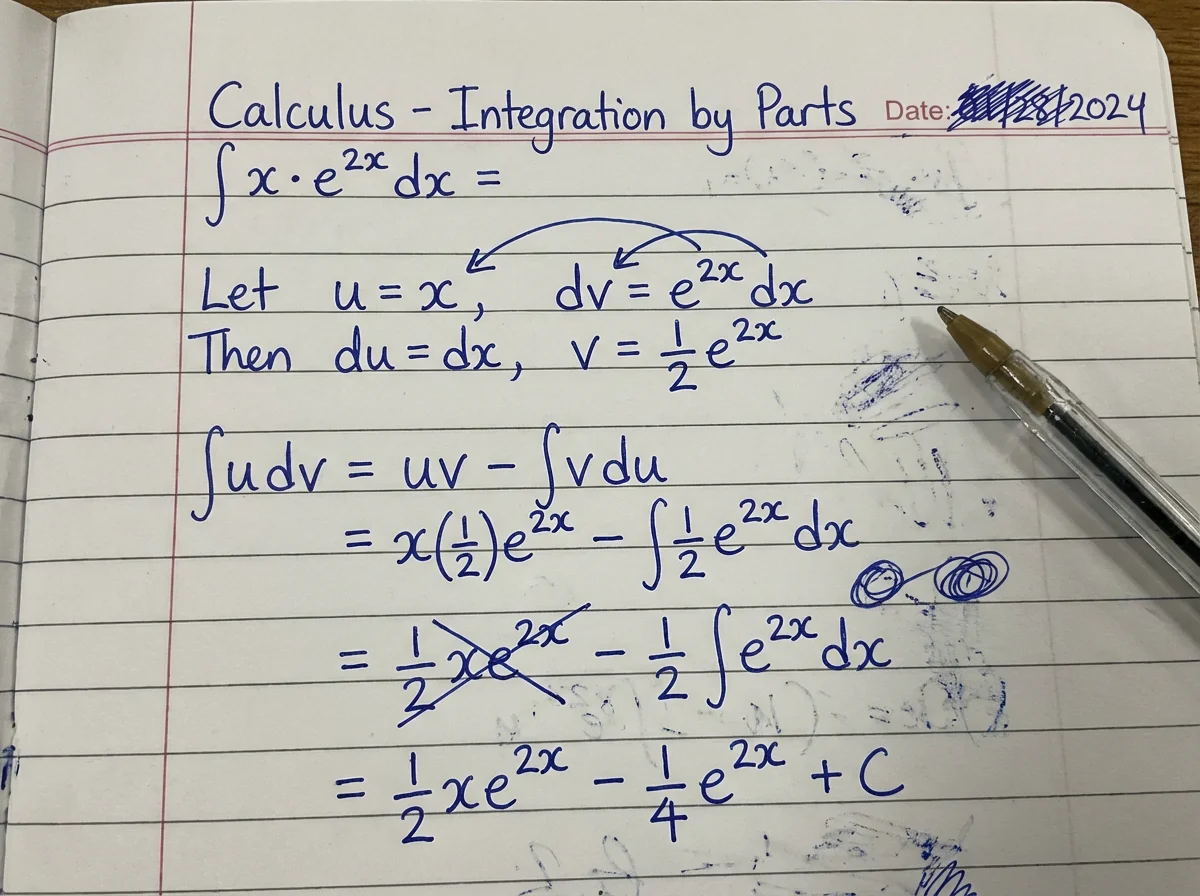
Example Prompt:
Input: [Image of handwritten calculus problem]
Task: Solve this calculus problem. Show step-by-step work.
Style: Mimic the handwriting from the input image exactly (messy blue ink, lined paper).
Output: Generate an image of the solution written below the original problem.
Constraint: The math must be correct. The handwriting must be indistinguishable from the source.
Practical Application: Personalized Education Materials
Scenario: An online tutor wants to create "handwritten" solution keys for their students to make the material feel more personal and less automated.
Workflow: The tutor writes the questions on a tablet, feeds the image to Nano Banana Pro, and asks it to "complete the worksheet." The model fills in the answers in a matching style. This scales the creation of "authentic" feeling educational content.
2. The "Search-Grounded" Diagram
"Hallucination" is the enemy of technical art. If you ask a standard AI for a "cutaway of a jet engine," it invents gears that don't exist and pipes that lead nowhere. Nano Banana Pro introduces "Search Grounding," a feature where the model cross-references Google Search data to verify visual facts before generating. This trick allows for the creation of factually accurate technical diagrams.
The Mechanism: Retrieval-Augmented Generation (RAG) for Pixels
When the "Grounding" feature is enabled (typically in Enterprise/Advanced versions), the model inserts a research step. Before generating the "V6 engine," it retrieves schematic data about V6 engines. It identifies the "pistons," "crankshaft," and "valves" as required entities. It then constrains the image generation to ensure these entities are present and spatially related in a way that aligns with the retrieved knowledge.
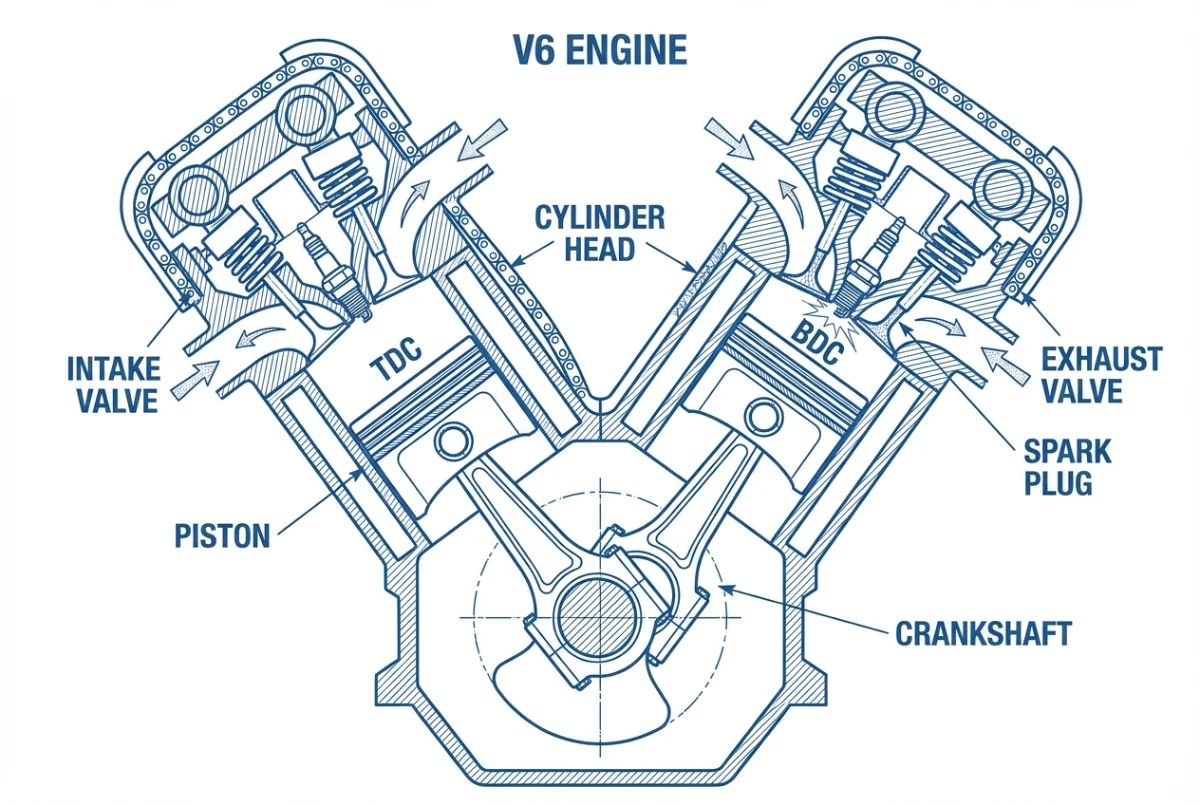
The Trick: The "Fact-Check" Prompt
The user must explicitly invoke accuracy and labels to trigger this mode.
Example Prompt:
Create a scientifically accurate cross-section diagram of a V6 engine.
Grounding: Use Google Search to verify component placement.
Labels: Label the "Pistons," "Crankshaft," "Valves," and "Spark Plugs" with pointer lines.
Style: Clean technical illustration, white background, blueprint blue lines.
Constraint: Ensure mechanical accuracy. No hallucinated parts.
Practical Application: Technical Manuals & Whitepapers
Scenario: A startup engineer needs a diagram of their new system architecture for a whitepaper but lacks CAD skills.
Workflow: The engineer inputs a prompt describing the system: "Diagram of a server rack with liquid cooling." They enable grounding. The model generates a diagram where the coolant pipes logically connect to the heat sinks, and the servers are stacked correctly. While an engineer should still review it, the base generation is 90% accurate, saving days of illustration work.
3. Multi-Character/Object Logic (Crowd Control)
Generating one consistent character is difficult; generating five distinct, specific characters in a single image is historically impossible for diffusion models due to "concept bleeding" (where attributes of one character, like a red hat, bleed onto another). Nano Banana Pro’s "Multi-Object Reasoning" enables a "Crowd Control" trick that assigns distinct attributes to distinct spatial regions.
The Mechanism: Semantic Segmentation & Attention Masking
Nano Banana Pro implicitly performs segmentation during the generation process. When the prompt describes "Person A on the left" and "Person B on the right," the model creates internal masks for these regions. It then directs the "Red Hat" token only to the mask of Person A and the "Blue Hat" token only to Person B. This reasoning capability (determining who is who) happens in the LLM stage before pixel generation.
The Trick: The "Spatial assignment" Prompt
The prompt must explicitly assign spatial locations to characters to help the model segment the image.
Example Prompt:
Scene: A corporate meeting room with 3 distinct people.
Person 1 (Far Left): Elderly man, grey beard, wearing a tweed suit.
Person 2 (Center): Young woman, red bob hair, wearing a green blouse.
Person 3 (Far Right): Middle-aged man, bald, glasses, wearing a blue t-shirt.
Action: They are debating at a whiteboard.
Constraint: distinct separation of features. Do not mix clothing colors.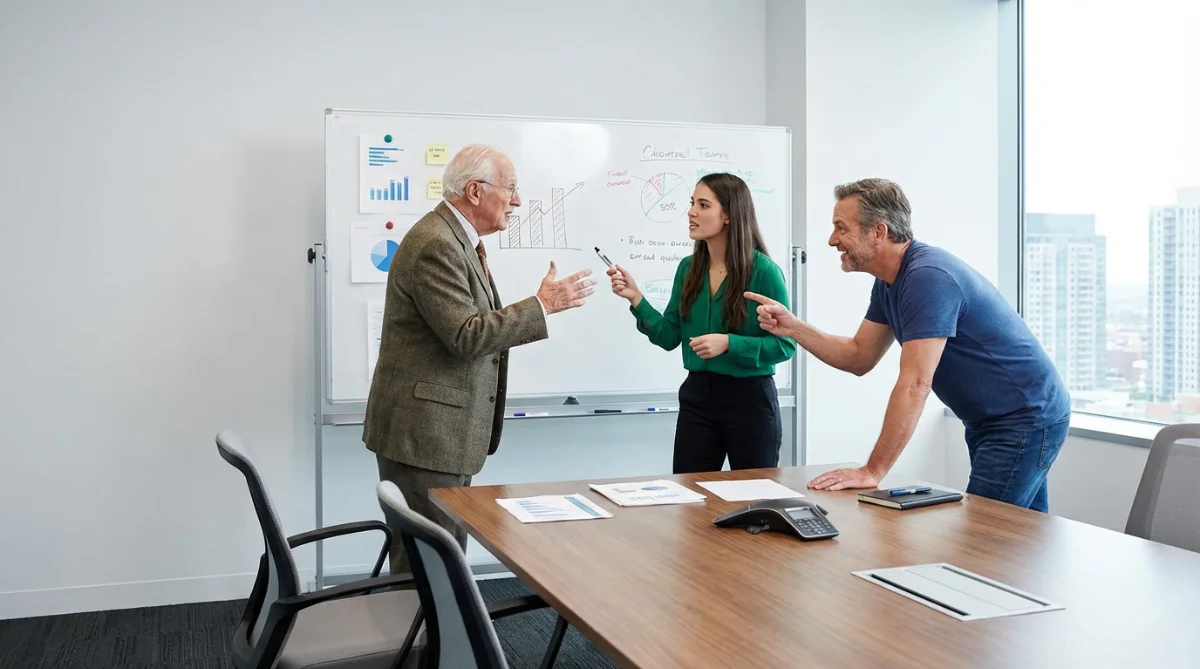
Practical Application: Diversity & Inclusion in Marketing
Scenario: An ad agency needs a stock photo of a diverse team working together, but stock sites are too generic.
Workflow: The prompt specifies: "A team of 4: One Asian woman (coding), one Black man (pointing), one White woman (taking notes), one Latino man (smiling)." Nano Banana Pro generates the group with accurate demographic representation and distinct actions, avoiding the "cloned" look where everyone looks like siblings. This allows for precise control over the visual narrative of diversity.
4. Aspect Ratio "Smart Recomposition" (Outpainting)
Most models are trained on square or 4:3 images. When pushed to extreme ratios like 21:9 (Ultrawide) or 9:16 (Vertical Video), they often stretch objects or duplicate heads. Nano Banana Pro features a "Smart Recomposition" logic that understands cinematic framing. It doesn't just crop or stretch; it re-composes the scene to fit the canvas.
The Mechanism: Variable Aspect Ratio Training
The model is trained on a wide variety of aspect ratios and understands the semantic concept of "Cinematic" or "Vertical." When asked for a 21:9 image, it adjusts its internal composition rules (like the Rule of Thirds). It widens the field of view, generating new peripheral content (landscapes, room details) rather than stretching the center. It effectively performs "Outpainting" during the initial generation.
The Trick: The "Canvas-Fill" Prompt
The user should prompt for the aspect ratio and describe what should fill the extra space.
Example Prompt:
Subject: A cowboy riding into the sunset.
Aspect Ratio: 21:9 (Cinematic Ultrawide).
Composition: Place the cowboy on the far left third (Rule of Thirds).
Detail: Fill the vast negative space on the right with dramatic desert mesas and a wide, cloud-streaked sky.
Constraint: Ensure no stretching of the horse. Maintain wide-angle lens distortion at edges.
Practical Application: Game Assets & UI Backgrounds
Scenario: A UI designer needs a background for a game menu that supports ultrawide monitors.
Workflow: Prompt for "21:9 Sci-Fi Landscape." The model generates a sweeping vista. Because of the high resolution (up to 4K), the asset is crisp enough to be used directly in the game engine. The logic ensures that key elements (like a planet or a ship) are not cut off by the frame edges.
5. Material & Texture Swaps (The "Soft" Edit)
This trick is the "Designer's Dream." It allows for the swapping of the material of an object without changing its geometry. "Make this leather chair look like it's made of clear plastic." Nano Banana Pro excels here due to its understanding of Physics-Based Rendering (PBR) concepts.
The Mechanism: Semantic In-Painting with PBR Logic
The model identifies the object (e.g., "chair") and its geometry. It then applies new "material tokens" (e.g., "translucent plastic," "subsurface scattering") to that geometry. It calculates how light would interact with the new material—passing through it if it's glass, or absorbing light if it's velvet—while respecting the original shape and perspective.
The Trick: The "Material-Override" Prompt
The prompt must explicitly state the new material properties and how light should interact with them.
Example Prompt:
Input: [Image of a sneaker]
Edit Instruction: Change the material of the sneaker upper to "Translucent Jelly Plastic."
Detail: It should look like 1990s electronics transparency (Gameboy Purple).
Lighting: Light should pass through the material, revealing internal structure.
Constraint: Keep the exact shape and stitching lines of the sneaker. Only change the material properties.
Practical Application: Fashion & Apparel
Scenario: A fashion designer wants to see a denim jacket design in velvet or leather.
Workflow: Upload the sketch or photo of the denim jacket. Prompt: "Change fabric to crushed velvet, emerald green." The model renders the complex light interactions of velvet (the way it shimmers on folds) onto the existing folds of the denim jacket image. This allows for rapid iteration on fabric choices without sewing physical samples.
6. Identity Preservation & Era Accuracy
Nano Banana Pro introduces "Identity Locking"—a feature that allows users to input a reference image of a person and generate them in different contexts while maintaining their core facial features. The model also applies "Semantic History." When asked for "1920s," it understands that this implies specific material limitations of the era (e.g., wool suits, specific collar shapes) and specific photographic artifacts (e.g., motion blur due to slower shutter speeds, silver nitrate grain). It changes the content to match the context.
Practical Application: Costume Design & Virtual Casting
Scenario: A casting director wants to visualize an actor for a period piece set in the 1880s.
Workflow:
- Input: Actor's modern headshot.
- Prompt: "Portrait of [Actor] as a 1880s railroad tycoon. Wet plate collodion photography style. Victorian formal wear."
- Result: The model generates the actor in a period-accurate suit. Crucially, it adjusts the skin texture; the "1880s" version will have the high-contrast, slightly gritty look of early photography, which is more useful for determining the "look" of the film than a simple Photoshop overlay.
7. The "Anachronism Police" Quirk
The model is surprisingly knowledgeable about history but can be tricked by its own associations. Sometimes, when generating "old" versions (e.g., 1920s), it unintentionally ages the person as well, because its training data associates black-and-white photos with older people. Users may need to explicitly prompt "Age: 25 years old" in every panel to prevent the subject from aging as they travel back in time. Additionally, it may hallucinate modern objects (like a smartphone) in historical settings if the negative prompt doesn't forbid "anachronisms".
8. The "Teacher's Pet" Quirk
The model is obsessive about "showing its work." If asked to solve a problem, it tends to be verbose, writing out every intermediate step even if not asked. Furthermore, its handwriting mimicry can sometimes be too perfect. It removes the natural messiness, tremors, or ink blots that make handwriting look human. To get a truly organic look, users often have to add prompt modifiers like "messy," "hasty," "scribbled," or "ink smudges".
9. The "Know-It-All" Quirk
The model's grounding can make it stubborn. If you want to generate a "fantasy machine" that defies physics (e.g., a car with square wheels), the model might fight you, attempting to "fix" the design to make it functional based on its world knowledge. You must explicitly prompt terms like "Surreal," "Fantasy logic," or "Impossible geometry" to override its desire for accuracy.
10. The "Clone Stamp" Glitch
Despite its logic, if the prompt is too vague about the faces (e.g., just "three men"), the model might reuse the same underlying face mesh for all characters, resulting in a creepy "clone" vibe. Users must be hyper-specific about facial features (nose shape, jawline, eye color) for each character to force the model to generate distinct identities. It needs "feature anchors" to differentiate them.
Conclusion: The Era of "Prompt Directing"
The transition to Nano Banana Pro (Gemini 3 Pro) signals a maturation of the AI art discipline. We are leaving the era of "Prompt Hacking"—where users collected magic words like "4k, trending on artstation"—and entering the era of Prompt Directing. The "Pro" in the model's name is not just marketing; it is a descriptor of the user it demands.
To use these 10 tricks effectively, you cannot be a passive slot-machine player. You must be an active director. You must understand layout hierarchy, curated references, lighting physics, and semantic history. You are no longer asking a machine to "make something cool"; you are collaborating with a reasoning engine to build something specific.
The model is smart. It knows history, physics, and typography. The question remains: are you ready to be the director it is waiting for?
Happy Prompting!
— The BananaPrompts.fun Team
Explore more high-quality Nano Banana prompts at Banana Prompts.