
Reference Images:
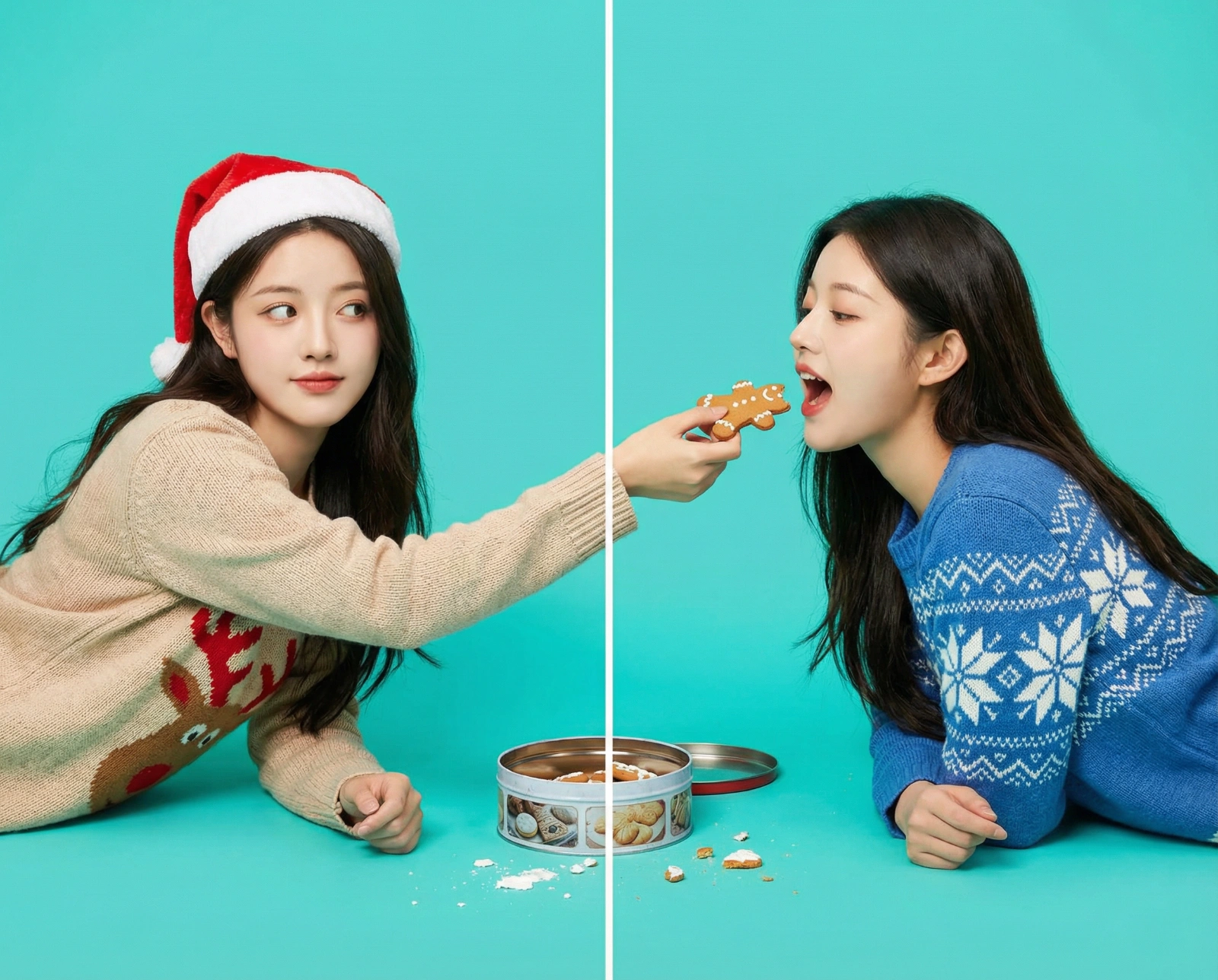
Gingerbread Cookie Handover
Prompt
**Key requirement: the faces of the two characters on both sides must be exactly identical to the source image.** **Left panel:** Wearing a beige sweater with a reindeer motif and a Santa hat, body leaning to the right. Holding a gingerbread cookie with one bite taken out, reaching across the central dividing line as if trying to hand it over, eyes looking toward the right side. **Right panel:** Wearing a blue sweater with a snowflake pattern, body leaning to the left, mouth open, reaching across the dividing line to receive the cookie. **Props:** A metal cookie tin on the floor with scattered icing around it. **Background:** Bright teal studio backdrop. **Lighting / Style:** Flat lighting, bright, playful, with a strong sense of storytelling.
Aspect Ratio
Source
@songguoxiansenModel
Nano Banana ProYou might also like
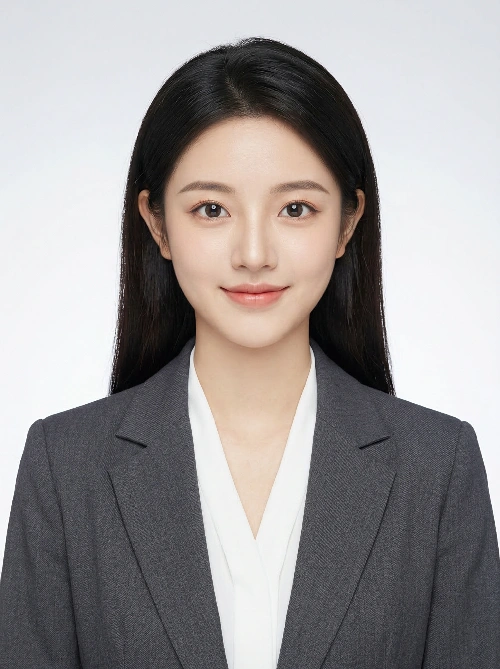
Modern Pro 3:4 Headshot
Intelligent professional portrait headshot in the style of American ID photography. The subject size is balanced and natural within the frame. Use a subtle light gray to white gradient studio background. Lighting is soft and natural, highlighting realistic skin tones and gentle depth. The image should be clear and high-quality with sharp facial focus. Skin texture appears clean, luminous, and healthy. The head-to-shoulder proportion is comfortable and natural. The overall mood is modern and elegant. The subject has a relaxed, natural, and confident expression with bright, lively eyes. Medium portrait framing with the subject centered in the composition. Low contrast lighting to create a refined, professional studio portrait aesthetic. Suitable for business and professional profile photos. Aspect ratio: 3:4.
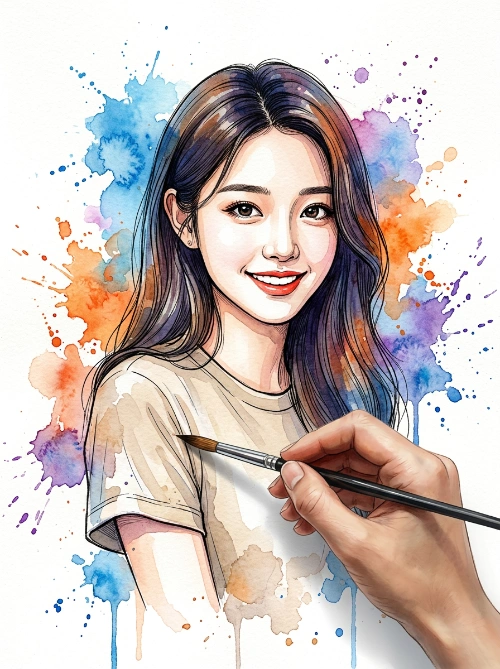
Dynamic Watercolor Portrait
Create a vibrant and artistic watercolor painting of a smiling person, using the uploaded photo as the facial reference without altering their facial features or appearance. The person is wearing a neutral-tone T-shirt. The background is clean white, filled with dynamic and expressive watercolor paint splashes in blue, orange, and purple spreading organically across the scene. In the foreground, a realistic human hand holds a paintbrush as if actively painting the sleeve of the man’s hoodie, creating the illusion that the portrait is being painted at that exact moment. The visual style combines detailed ink line art with loose watercolor textures, including paint drips, fine splatters, soft pigment diffusion, watercolor blooming effects, and natural paper texture. The image features strong contrast, an expressive and dynamic artistic look, a clear hand-painted aesthetic, centered composition, soft lighting, high level of detail, and a modern illustration style.
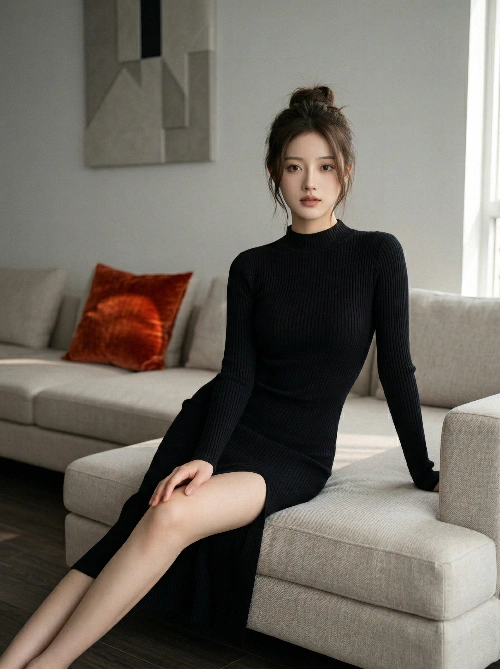
Elegant Home Fashion Portrait
Core Concept Using the uploaded real female subject as the visual reference, generate a magazine-quality fashion indoor portrait. The image should convey a calm, intimate, and luxurious modern atmosphere, capturing the subject’s elegant and relaxed state in a home environment, achieving the realism and artistic expression of high-end editorial photography. Subject Reference and Styling Reference: Strictly follow the facial features, body proportions, and personal aura of the uploaded subject. Emphasize refined facial structure and a slender, elegant figure. Expression: Calm with a subtle sense of focus; soft, confident, and slightly penetrating gaze directed at the camera, creating a delicate and intimate allure. Hairstyle: Long dark brown hair, loosely tied at the back into a slightly messy bun with natural volume, with a few loose strands falling along the sides of the face. Makeup and Accessories: Clean, natural makeup—almost no-makeup look. Accessories should be minimal, such as small earrings or none at all. Outfit and Pose Clothing: A black ribbed knit long-sleeve dress with a high neckline. The dress is form-fitting, contouring the body shape, with a high side slit that subtly reveals the leg depending on the pose. Pose: Seated gracefully on a light beige sectional sofa. The body is slightly angled toward the camera; one leg is bent and placed on the sofa, while the other extends forward, naturally revealing the leg through the slit. One hand rests casually on the bent knee, while the other is relaxed on the sofa cushion. The pose is composed, elegant, with a slight forward-leaning engagement. Environment and Lighting Environment: A modern interior living room. The background wall is gray-white, featuring a warm-toned abstract geometric artwork. The floor is dark wood. The space is clean and minimal, with a single accent color provided by an orange-red cushion on the sofa. Lighting: Soft natural daylight, simulating diffused light entering from a side window. Lighting is even with soft shadows, low to medium contrast. Color temperature is neutral-warm, creating a cozy and inviting atmosphere. Composition and Image Quality Composition: Medium-wide shot capturing the full seated pose on the sofa. The camera is positioned slightly above eye level with a subtle angle. Use the rule of thirds, placing the subject slightly to the right, balanced by the wall art. A slight foreground blur on the right edge (such as a wall or frame edge) can be included. Technical: Simulate a 35mm to 50mm lens perspective, with shallow to medium depth of field—sharp focus on the subject, slightly blurred background. Style and Quality: High-end fashion magazine photography style. Clean, ultra-high resolution image with neutral color grading, slightly warm highlights, and slightly reduced saturation for a refined, understated aesthetic. Avoid harsh shadows, overexposure, cluttered backgrounds, anatomical errors, low resolution, watermarks, or text. Mood and Atmosphere Overall Mood: Minimalist, fashionable, mature, and refined. Atmosphere: Calm, intimate, modern luxury—capturing an effortless sense of sophistication and the quiet charm of everyday living.
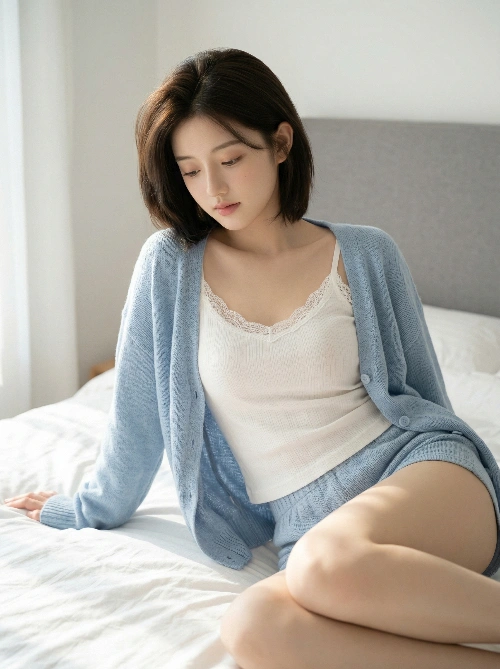
Gentle Morning Bedroom Port
Core Concept Using the uploaded real female subject as the visual reference, generate a soft, healing-style intimate portrait set in a bedroom during gentle morning light. The image emphasizes naturally relaxed posture and understated sensuality, achieving a balance that is modest yet visually engaging, soft yet full of tension. The goal is to create a poetic, emotionally resonant lifestyle narrative. Subject Reference and Styling Reference: Strictly follow the facial features, structure, and youthful aura of the uploaded subject. Preserve her short hairstyle. Expression: Gentle expression with a slightly downward gaze, conveying a blend of laziness and calm introspection. Body language is naturally relaxed with a subtle sense of reserved shyness. Hairstyle: Dark brown short hair, smooth with natural volume, slightly curled at the ends. Clothing: Inner layer: A simple white cotton camisole with slightly wider straps, a small round or subtle U-shaped neckline, possibly with delicate lace trim. The fit follows the natural body shape, subtly outlining curves. Outer layer: A loose, light blue knit cardigan with a relaxed silhouette. The front remains slightly open, faintly revealing the inner layer. Bottom: Matching high-waisted cotton shorts in a similar tone, with length covering mid-thigh. Accessories: Minimal, such as small metal stud earrings (if present in the original reference). Scene, Details, and Interaction Main setting: A private bedroom with a light gray upholstered headboard and soft, voluminous white bedding with natural wrinkles. Pose: A semi-reclining position on the bed, supported naturally by the arms. Legs are gently extended and slightly bent, forming soft body lines. Lighting: Soft morning natural light enters from the left, creating a gentle gradient of light and shadow, highlighting the knit texture, cotton fabric, and bedding folds. Details: Clearly render the layered bedding, knit textures, and camisole strap and neckline details. Use a balance of modest skin exposure and well-fitted clothing to create understated sensuality. Lighting, Composition, and Image Quality Lighting: Soft natural key light with warm, gentle tonal transitions and delicate shadows. Composition: Medium close-up portrait focusing on the upper body and face, with a softly blurred background. Color palette: Low-saturation, soft tones (light blue, off-white, gray) to enhance a calming, healing atmosphere. Image quality: 8K ultra-high resolution with extreme detail in knit fibers, cotton wrinkles, bedding textures, and natural skin luminosity. Style and Keywords Style: Editorial intimate photography × Japanese healing aesthetic × emotional portrait Keywords: soft, subtle, relaxed, natural curves, intimate space, soft lighting, cotton texture, low saturation
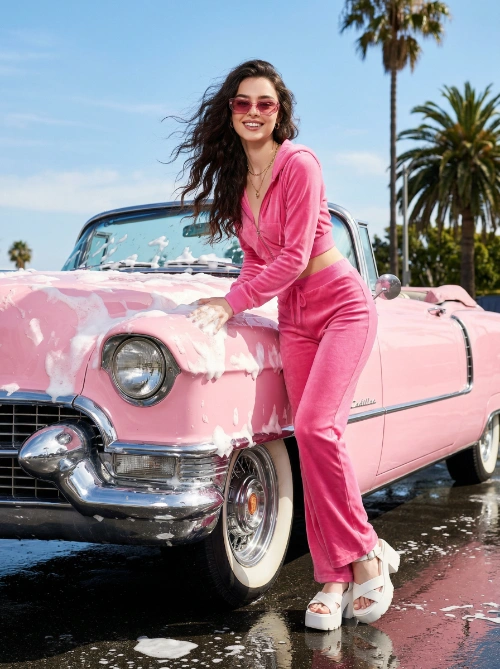
Y2K Retro Summer Drive
Core Concept Using the uploaded real female subject as the visual baseline, generate a high-fashion editorial image infused with Y2K retro aesthetics and strong visual contrast. The scene captures the subject in a summer outdoor setting, interacting with a pink vintage convertible covered in decorative foam, creating a lively, nostalgic, and fashion-forward visual narrative. Character Baseline and Styling Baseline: Strictly follow the facial features, structure, and personal aura of the subject in the uploaded image. Expression: Confident with a playful edge. Skin: Naturally radiant with a healthy glow. Physique: Well-proportioned and fit, with a natural forward-leaning posture. Hair: Long, dynamic wavy hair, gently lifted by a light breeze for a sense of motion. Outfit: Bright pink two-piece casual set paired with matching stylish sandals. Accessories: Fashion sunglasses, a delicate necklace, and minimal rings. Pose, Scene, and Lighting Pose: The subject leans naturally against the car, with both hands lightly touching the foam-covered surface. Scene: Bright outdoor setting featuring a pink vintage convertible coated in decorative foam as the central prop. Environment: Slightly wet ground reflecting ambient daylight, creating natural reflective highlights. Lighting: Bright natural sunlight producing balanced highlights and shadows, enhancing contrast and dimensionality. Color Palette: Dominant pink tones complemented by blue sky and white foam, forming a harmonious and vibrant color scheme. Atmosphere: Playful, nostalgic, and stylish. Composition, Quality, and Style Composition: Eye-level perspective with a slightly wide-angle feel. Technical Settings: Aperture at f/4.0 to maintain clarity across the frame. Image Quality: High-detail photorealism with strong emphasis on material textures and light behavior. Visual Style: Y2K-inspired retro fashion with cinematic storytelling.

Candid High-Angle Slice
A high-angle tilt-shift cinematic image of the character captured naturally doing an everyday activity. The moment must feel candid and unstaged, like a quiet slice of life observed from above. Likeness Preservation Maintain exact proportions, eye shape, spacing, stylization, and material identity from the reference. Do not humanize. Do not reinterpret anatomy. Do not exaggerate realism. Camera & Perspective High-angle, slightly offset bird’s-eye view. Subtle isometric feeling. Equivalent to a 35mm lens adapted for tilt-shift photography. The character fills approximately 60–65% of the frame vertically. Breathing room above the head. Visible ground plane beneath. No extreme distortion. Focus Discipline (CRITICAL) Extremely shallow depth of field. Only the face and upper torso must be razor sharp. Hands interacting with an object may also be sharp. Lower legs and shoes must be slightly softened. Ground surface must progressively soften toward the bottom edge. Top and bottom edges must show strong optical tilt-shift blur. The focus band must be narrow and centered horizontally. No full-body sharpness. Pose Behavior The character must be naturally engaged in a daily action. Movement must feel subtle and believable. No staged hero poses. No exaggerated symmetry. Silhouette must remain clean and readable. Props or minimal furniture may be included only if necessary to support the action. Keep them simple and secondary. Lighting Control Bright natural daylight with firm directional key light. Light must carve the form clearly. Defined shadow under feet or object. Crisp shadow edge on ground. Subtle rim light separating character from background. No flat studio wash. No overly diffused light. Background Discipline Abstract minimal environment. Soft tonal gradient. Slight atmospheric depth. No detailed storytelling clutter. No heavy furniture unless essential to action. Background must support the character, not compete. Background Directional Structure (CRITICAL) Upper third of frame must contain soft luminous bokeh shapes or circular light blobs, gently out of focus, slightly brighter than mid-ground. Mid-ground remains neutral and unobtrusive. Lower ground plane must have subtle diagonal orientation, with a light-to-dark gradient guiding the eye upward toward the character’s head. Ground texture may contain faint linear perspective cues, but remain soft and minimal. The tonal gradient must travel from slightly darker bottom edge toward brighter mid-upper region behind the head. No flat monotone background. Color & Material Character slightly higher saturation than background. Background slightly muted. Clean premium collectible finish. Subtle surface sheen. No gritty realism. No artificial wear. Emotion Calm presence. Quiet confidence. A simple daily act elevated through composition and light. Not dramatic. Not heroic. Intimate but cinematic. Negative Lock No full-body sharpness No flat background No cluttered environment No stiff symmetrical pose No soft diffused lighting No dramatic battle energy No exaggerated realism
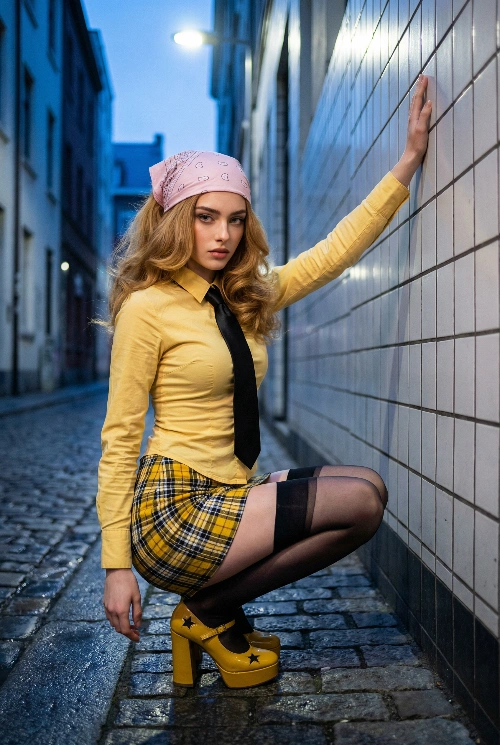
Cinematic Squat Fashion Portrait
{ "subject": { "identity": { "biometric_reference": "female from reference photo", "dentition": "Visible maxillary central incisors with natural alignment and translucent enamel edges, displayed in a slight mouth-open neutral expression.", "ocular_details": "Highly detailed iris patterns featuring radial furrows and Crypts of Fuchs. Iris pigmentation: Light cerulean blue with a hint of golden-green peripupillary ring. Detailed scleral vasculature and wet-look corneal reflections.", "hair": "Voluminous honey blonde hair (Hex: #E2BC74) with visible follicular texture, cascading naturally from under the bandana. Strands exhibit high specular highlights and anisotropic scattering." }, "body": { "morphology": "Mesomorphic-endomorphic somatotype, petite stature, approximately 151cm height. Precise waist-to-hip ratio (WHR) of 0.7. Body positioned in a full squatting stance in side profile.", "skin_physics": "Fair complexion (Hex: #F7E0D2) with subsurface scattering (SSS) effects. High-fidelity skin texture showing pores and natural epidermal micro-details. No beautify smoothing." }, "wardrobe": { "headwear": "Light pink bandana (Hex: #FF91AF) with subtle paisley micro-patterns, tied over the crown of the head.", "top": "Long-sleeved button-down shirt in vibrant yellow (Hex: #FDEE00). Tight-fit tailoring with realistic tension folds across the torso. Paired with a slim black silk necktie.", "bottom": "High-waisted pleated mini skirt featuring a yellow, black, and white plaid weave. Extremely short length with sharp pleats showing fabric tension in the crouching pose.", "hosiery": "Sheer black thigh-high stockings (20 denier) with a thick, opaque black elastic band at the mid-thigh. Clear skin-to-fabric transition above the knee.", "footwear": "Yellow platform heels (Hex: #FDEE00) with wide ankle straps and star-shaped decorative cutouts. Glossy synthetic leather finish with hard-surface reflections." }, "pose_action": "The subject is in a full squatting position viewed from a side-profile. The subject's right arm is extended vertically upwards with the palm pressed flat against the white tiled wall. The left arm hangs naturally by the side. The head is turned toward the camera with a direct, intense gaze. The subject is balanced on the balls of her feet.", "scene": { "environment": "Narrow urban alleyway at night. The wall on the right is composed of white square ceramic tiles with dark grout lines. The ground is grey cobblestone/pavement with a matte texture.", "depth": "Deep perspective showing the continuation of the alleyway and modern architectural structures in the background under a twilight sky.", "atmosphere": "Cinematic nighttime clarity with high contrast between the lit subject and the dark, shadowed urban environment." }, "lighting": { "primary": "Cool-toned overhead street lighting combined with soft ambient blue twilight. Strong directional light creates defined shadows on the tiled wall.", "secondary": "Soft fill lighting to preserve detail in the black tie and plaid skirt textures.", "physics": "Accurate Fresnel reflections on the white tiles and specular highlights on the glossy platform shoes." }, "camera": { "format": "9:16 vertical aspect ratio", "lens": "35mm prime lens for cinematic perspective.", "angle": "Low-angle shot, positioned at knee level to emphasize the posture and the height of the wall.", "settings": "f/2.8 aperture, ISO 100, 8k resolution, raw capture style." }, "negative_constraints": [ "no logos", "no text", "no trademarks", "no beautify smoothing", "no extra limbs", "no watermark", "no jewelry on neck", "reflection integrity rules applied to tiled surfaces" ] } }
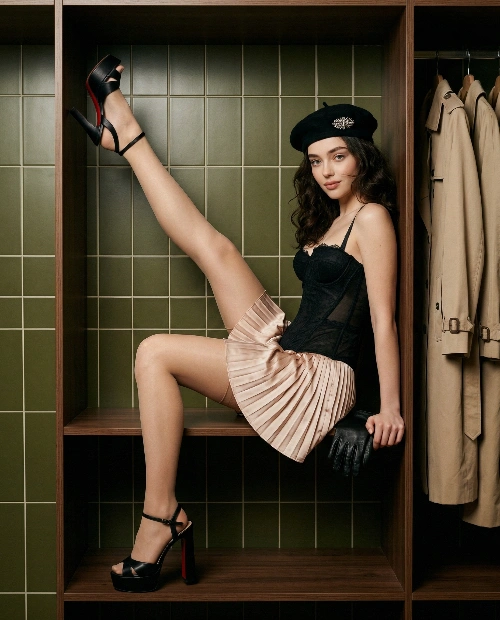
Enclosed Frame Fashion Portrait
[Core Concept] Style Direction: High-fashion editorial portrait photography, blending “frame-within-a-frame” composition with intimate spatial storytelling. Emphasis on precision, restraint, and a gaze-driven visual language. Theme Atmosphere: Refined, intimate, subtly provocative. Capture the subject in a self-presentational moment within an enclosed wardrobe space, conveying composed awareness of being observed through pose and lighting. Reference Baseline: Strictly use the uploaded subject as the sole visual identity source. Accurately reproduce facial structure, proportions, personal aura, and body characteristics without stylization. [Composition and Framing] Aspect Ratio: 4:5 vertical. Camera Angle: Eye-level, aligned with the wardrobe compartment opening (approx. 90 cm height). Visual Focus: “Frame-within-a-frame” — the dark wooden wardrobe compartment acts as a natural frame, fully enclosing the subject. Scene Structure: * The subject is positioned entirely inside the compartment, forming intersecting diagonal body lines. * Left leg raised high, foot pressed against the top frame, forming a strong diagonal from bottom-left to top-right. * Right leg extended horizontally, foot braced against the right inner wall, forming a secondary diagonal. * Torso and head create a third, shorter diagonal line. * Background: deep olive/khaki grid-patterned tiles, contrasting rigid geometry with organic body curves. * Right edge of frame: hanging beige/cream trench coats, adding environmental realism and tonal balance. [Character Rendering] Facial Features: Faithfully reproduce the subject’s facial structure and expression. Expression: Direct eye contact with a subtle smile — composed, slightly provocative. Details: Large expressive eyes, defined lashes, neutral to slightly pouted lips. Head Position: Chin slightly tucked (~5° downward tilt), creating a subtle “looking up through lashes” effect. Skin Tone: Natural with soft blush on cheeks. Hair: * Center-parted, long hair past shoulders. * Left side falls forward over shoulder and chest; right side falls behind. * Soft waves, warm brown tone with subtle highlights under directional light. * A few loose strands fall beneath the beret edge onto the forehead. Body Pose: * Seated inside the compartment. * Back pressed against the left inner wall. * Torso slightly leaning forward and to the right. * Legs form the primary compositional structure (raised left leg, extended right leg). * Arms: left arm mostly hidden behind leg/body; right hand supports on the shelf near the right hip. * Overall body forms a Z-shaped dynamic within the rectangular frame. [Wardrobe and Accessories] Corset: Black structured corset with strong boning; satin or leather finish with subtle sheen. * Sweetheart neckline with black lace trim. * Center front features delicate lacing or bow detail. * Ends at natural waist, revealing transition to skirt. Skirt: Champagne pink satin ultra-mini skirt with pleats, high-waisted. * Fabric catches warm highlights, drawing attention to hips and upper thighs. Footwear: Black platform heeled sandals (ankle strap). * Heel height: 12–15 cm, platform: 3–4 cm. * Open-toe or peep-toe design. * Left raised foot reveals a red sole (Louboutin-inspired), adding a vivid accent. Accessories: * Black military-style beret, tilted to the right side. * Large crystal/rhinestone brooch on the front-right of the beret — brightest specular highlight in frame. * Black leather gloves, removed and placed on the shelf beside the subject. * Nude/transparent stockings with subtle sheen, enhancing leg contours. Color System: Dominant black (corset, shoes, beret, gloves) + champagne pink accent (skirt) + warm nude (skin, stockings) + red highlight (shoe sole) + crystal sparkle (brooch). [Environment and Props] Setting: Luxury walk-in wardrobe interior. Compartment Interior: Deep olive/khaki tiled wall with visible grout lines and subtle matte/metallic finish. Structure: Dark-stained wood frame and surfaces, matte finish. Outer Edge (right): 2–3 hanging garments (beige/cream coats) for realism. Shelf Surface: Black leather gloves placed near the subject’s right hip as a deliberate styling element. [Lighting and Color] Lighting Type: Soft directional key light, editorial and controlled. Direction: From upper-left (~45° angle). * Creates gradient from brighter left to darker right within the compartment. * Soft shadows define face, neck, and body contours without harsh falloff. * Shadows remain detailed, not crushed to black. Material Interaction: * Corset surface captures controlled specular highlights. * Raised left leg (facing light) is brighter than the right, creating tonal separation. * Hanging garments on the right catch slight highlights as secondary accents. Color Science: Inspired by Fujifilm PRO Neg Hi * Professional portrait tones with controlled saturation. * Warm, accurate skin tones (not overly orange). * Champagne pink acts as a controlled highlight accent. * Moderate highlight roll-off; bright but not clipped. * Warm-neutral shadows with depth. * Medium-high contrast for editorial separation. * Minimal grain for clean, professional output. [Emotion and Narrative] Core Mood: Display-case elegance — a living subject consciously presenting herself within a private, enclosed space. Atmosphere: Cocoon-like intimacy — warm, dim, enclosed, and refined. Narrative: Through framing, pose, lighting, and wardrobe, convey themes of self-display, observation, and control within a private environment. [Technical Specifications] Lens: 50mm prime Aperture: f/2.8 Image Quality: Professional digital photography, ultra-detailed, sharp focus on face and pose, 8K resolution Rendering: Hyper-realistic skin and material response, natural light transitions, rich environmental detail, high-end editorial finish