
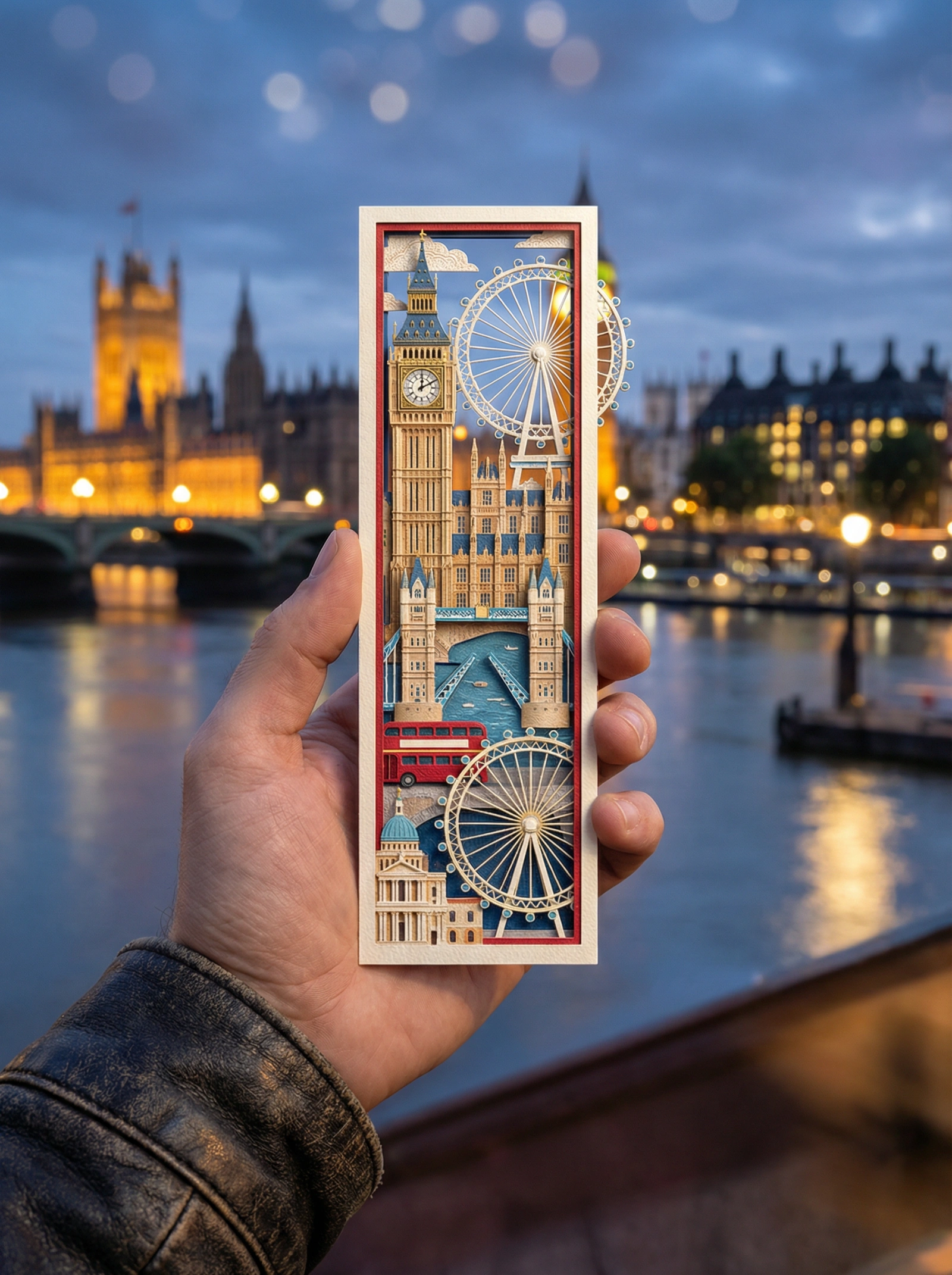
Nostalgic London Bookmark Night
Prompt
{ "image_request": { "subject": "A person's hand holding a long, narrow vertical die-cut bookmark", "bookmark_design": { "style": "Intricate layered paper-cut illustration, 3D depth, whimsical artistic style", "content": "Iconic landmarks and symbols of London depicted inside the bookmark frame, including Big Ben, the Houses of Parliament, Tower Bridge, a red double-decker bus, and the London Eye, with some elements slightly popping out of the edges (die-cut)", "artistic_elements": "Delicate textures, vibrant yet refined colors, miniature architectural details" }, "background": { "setting": "A romantic, cinematic wide shot of the London skyline along the River Thames, with historic and modern architecture visible in soft focus", "depth_of_field": "Soft bokeh, blurred background to emphasize the bookmark in focus", "time_of_day": "Night with city lights", "lighting_effects": "Cool evening tones with warm golden highlights from street lamps and illuminated landmarks reflecting on the Thames" }, "composition": { "framing": "Close-up on the hand and bookmark, centered vertically", "vibe": "Nostalgic, aesthetic, travel-inspired, poetic", "color_palette": "Harmonized cool blues and grays accented by warm golds and reds between the bookmark illustration and the real-world background" }, "technical_specs": { "quality": "8k resolution, highly detailed, photorealistic hand, sharp focus on bookmark", "aspect_ratio": "3:4" } } }
Aspect Ratio
Source
@firatbilalModel
Nano Banana ProYou might also like
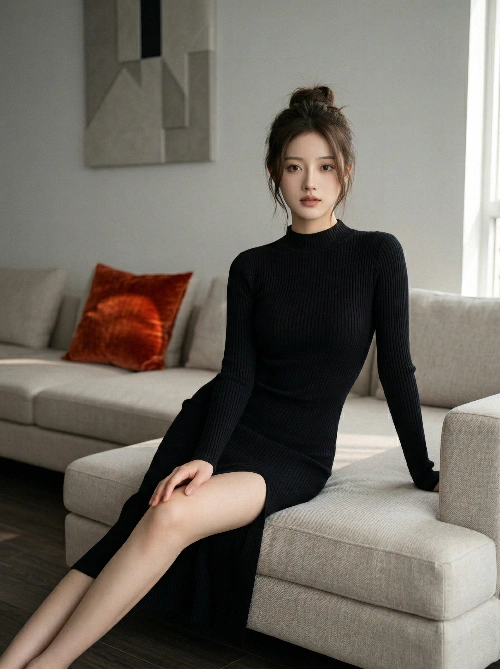
Elegant Home Fashion Portrait
Core Concept Using the uploaded real female subject as the visual reference, generate a magazine-quality fashion indoor portrait. The image should convey a calm, intimate, and luxurious modern atmosphere, capturing the subject’s elegant and relaxed state in a home environment, achieving the realism and artistic expression of high-end editorial photography. Subject Reference and Styling Reference: Strictly follow the facial features, body proportions, and personal aura of the uploaded subject. Emphasize refined facial structure and a slender, elegant figure. Expression: Calm with a subtle sense of focus; soft, confident, and slightly penetrating gaze directed at the camera, creating a delicate and intimate allure. Hairstyle: Long dark brown hair, loosely tied at the back into a slightly messy bun with natural volume, with a few loose strands falling along the sides of the face. Makeup and Accessories: Clean, natural makeup—almost no-makeup look. Accessories should be minimal, such as small earrings or none at all. Outfit and Pose Clothing: A black ribbed knit long-sleeve dress with a high neckline. The dress is form-fitting, contouring the body shape, with a high side slit that subtly reveals the leg depending on the pose. Pose: Seated gracefully on a light beige sectional sofa. The body is slightly angled toward the camera; one leg is bent and placed on the sofa, while the other extends forward, naturally revealing the leg through the slit. One hand rests casually on the bent knee, while the other is relaxed on the sofa cushion. The pose is composed, elegant, with a slight forward-leaning engagement. Environment and Lighting Environment: A modern interior living room. The background wall is gray-white, featuring a warm-toned abstract geometric artwork. The floor is dark wood. The space is clean and minimal, with a single accent color provided by an orange-red cushion on the sofa. Lighting: Soft natural daylight, simulating diffused light entering from a side window. Lighting is even with soft shadows, low to medium contrast. Color temperature is neutral-warm, creating a cozy and inviting atmosphere. Composition and Image Quality Composition: Medium-wide shot capturing the full seated pose on the sofa. The camera is positioned slightly above eye level with a subtle angle. Use the rule of thirds, placing the subject slightly to the right, balanced by the wall art. A slight foreground blur on the right edge (such as a wall or frame edge) can be included. Technical: Simulate a 35mm to 50mm lens perspective, with shallow to medium depth of field—sharp focus on the subject, slightly blurred background. Style and Quality: High-end fashion magazine photography style. Clean, ultra-high resolution image with neutral color grading, slightly warm highlights, and slightly reduced saturation for a refined, understated aesthetic. Avoid harsh shadows, overexposure, cluttered backgrounds, anatomical errors, low resolution, watermarks, or text. Mood and Atmosphere Overall Mood: Minimalist, fashionable, mature, and refined. Atmosphere: Calm, intimate, modern luxury—capturing an effortless sense of sophistication and the quiet charm of everyday living.
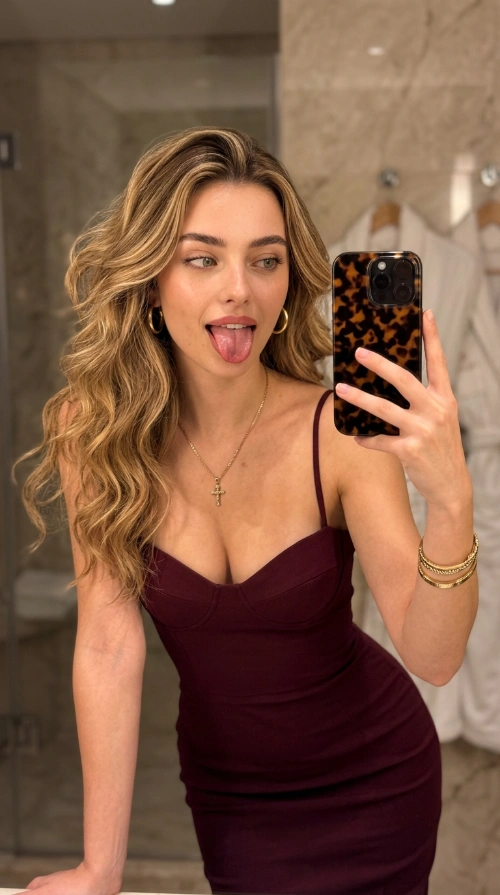
Glam Mirror Selfie
{ "image_type": "Photograph, Mirror Selfie", "shot": "Medium Shot", "shot_details": "Handheld mirror reflection, slightly tilted angle", "style": "Modern Lifestyle, Social Media Aesthetic", "quality": "High-fidelity, mobile photography style", "color_grade": "Warm indoor tones, saturated burgundy", "meta": { "aspect_ratio": "9:16", "resolution": "4k" }, "camera": { "device": "iPhone 17 Pro", "lens": "24mm f/1.8 Wide Angle", "aperture": "f/1.8", "distance": "Arm's length", "angle": "Eye level, slightly tilted", "framing": "Upper body and torso", "pov": "Subject looking into a mirror", "focus": "Sharp on face and eyes", "lens_effect": "Natural mobile sensor depth of field" }, "lighting": { "description": "Warm indoor vanity lighting from a bathroom mirror", "type": "Soft diffused light", "source": "Overhead and side vanity bulbs", "primary": "Warm frontal glow", "secondary": "Ambient indoor light", "highlights": "Soft specular highlights on the shoulders and hair", "shadows": "Soft shadows under the jaw and dress folds" }, "scene": { "location": "Upscale Bathroom or Dressing Room", "environment": "Interior, marble-textured walls, white bathrobes hanging in the background", "time": "Evening", "atmosphere": "Casual, playful, intimate" }, "subject": { "gender": "Female", "age": "Early 20s", "ethnicity": "Caucasian", "appearance": "Glamorous, fit, light tan", "body": { "type": "Slim, athletic", "skin": "Smooth, radiant" }, "expression": { "eyes": "Almond-shaped, focused on the phone screen", "gaze": "Indirect via mirror", "face_vibe": "Playful, cheeky, tongue sticking out" }, "hair": { "color": "Honey blonde with darker roots and highlights", "style": "Long, voluminous, loose waves" }, "pose": { "description": "Leaning slightly forward, one arm holding the phone, other arm supporting the lean" } }, "wardrobe": "Elegant maroon bodycon cocktail dress", "outfit_details": { "top": { "type": "Sweetheart neckline with spaghetti straps", "color": "Deep Burgundy / Maroon" }, "bottom": { "type": "Bodycon fit", "color": "Maroon" } }, "accessories": { "jewelry": [ "Gold hoop earrings", "Gold chain with a small cross pendant", "Stacked gold bracelets", "Tortoise-shell pattern phone case" ] }, "details": { "skin_effects": [ "Subtle pores", "Dewy finish" ], "realism": "High, organic skin texture, natural highlights on the tongue" }, "negatives": "Low resolution, blurry, distorted face, messy background, oversaturated skin, plastic texture" }
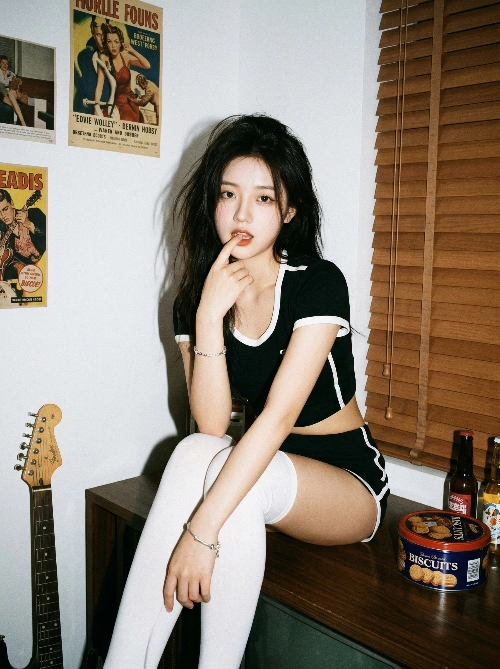
Rebellious 90s Cool Girl Portrait
Using the uploaded real subject as the visual baseline, create a full-body portrait with an independent, rebellious aesthetic and a vintage film texture. Embrace a 1990s point-and-shoot camera style, using direct flash, high-contrast lighting, retro color grading, and casual composition to convey a raw, authentic, and edgy “cool girl” atmosphere. Character Setup (Based on the real uploaded subject) Baseline: Use the real female subject as the foundation, preserving her facial features and body proportions. Hair: Thick, slightly messy long hair (color matching the uploaded subject). Outfit: Sporty black cropped top with white trim, paired with matching black shorts and white over-the-knee socks. Accessories: A silver bracelet worn on the wrist. Pose and Composition Pose: Sitting casually on an elevated dark wooden surface (such as a counter or piano top). The body leans forward slightly, relaxed but with a sharp edge. One hand is raised near the mouth, lightly biting a finger. The gaze is directed straight at the camera, with a sensual yet nonchalant expression. Composition: Full-body shot using a 35mm focal length, slightly low-angle perspective to emphasize leg lines. Medium-distance framing, appearing spontaneous yet visually balanced. Sharp focus on the subject, with the background falling off due to the rapid light decay of direct flash. Scene and Details Background: A white wall decorated with vintage posters taped onto it, along with brown wooden blinds. Foreground and Props: Include visible elements such as the neck of an electric guitar, a tin of cookies, and several bottles to enhance the lived-in, candid atmosphere. Lighting and Color Lighting: Simulate direct on-camera flash with hard lighting. The light should be harsh and frontal, casting sharp, well-defined shadows on the wall behind the subject. High contrast, with no soft lighting or diffusion. Color and Texture: Vintage film aesthetic, emulating Kodak Gold 200 tones. Warm hues from wooden blinds and furniture contrast with the cool white flash. Colors should be deep and slightly muted, with rich blacks and subtle film grain, creating a lo-fi indie visual style. Overall Mood and Style Style: Independent, rebellious “cool girl” aesthetic. Raw, authentic, with a Y2K-inspired retro fashion editorial vibe, resembling a snapshot. Mood: Casual, direct, with a hint of playful defiance. Technical Specifications and Constraints Image Quality: Photorealistic, but intentionally incorporating vintage film imperfections and direct-flash artifacts. Avoid: Soft lighting, studio lighting setups, shallow depth-of-field bokeh effects, polished studio portraits, skin smoothing, 3D-rendered looks, cartoon or illustration styles, distorted hands, missing guitar strings, floating objects, anatomical inaccuracies, stiff posing, excessive post-processing, and HDR effects.
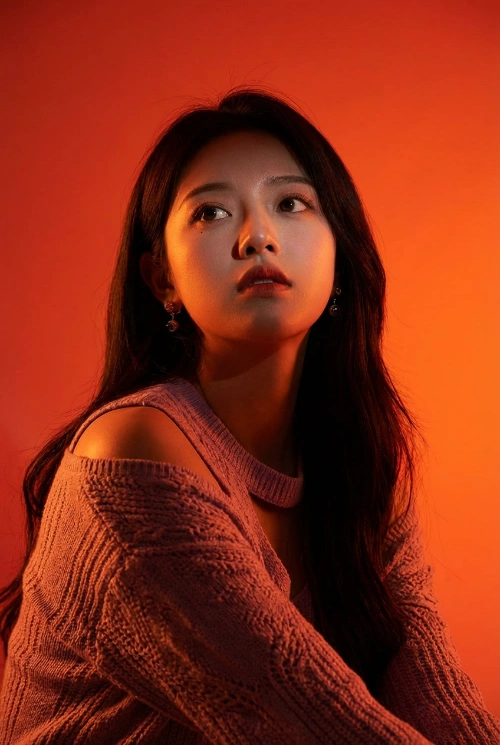
Heroic Dramatic Studio Port
{ "meta": { "title": "Heroic Dramatic Studio Portrait", "role": "World-class photographer specializing in editorial portraits", "aesthetic": "Dramatic, saturated studio lighting with a heroic feel" }, "constraints": { "identity_anchor": { "source": "ATTACHED REFERENCE PHOTO", "strictness": "Critical", "instruction": "Perfectly preserve exact facial features, skin tone, hairstyle, and natural likeness without changes." }, "clothing_anchor": { "source": "EXACTLY AS IN REFERENCE PHOTO", "strictness": "Critical", "instruction": "Style, color, material, and fit must fully correspond to the original without stylization." } }, "subject_details": { "expression": "Serious, tense, focused", "gaze": "Directed away from camera, into space above", "universality": "Lighting and angle applicable regardless of gender" }, "composition": { "background": "Saturated solid orange-red backdrop, smooth intense gradients, no patterns, 'hot' atmosphere", "camera_angle": "Low angle (shot from below upwards) to create dominance", "framing": "Medium close-up, emphasis on face and shoulders" }, "lighting": { "palette": "Dominant bright oranges and deep red shades", "key_light": "Strong directional source, deep dramatic shadows (chiaroscuro), emphasizing facial structure", "backlight": "Powerful expressive rim light or color halo separating subject from background", "mood": "Mysterious, tense, high-contrast" }, "technical_specs": { "style": "Photorealism, high detail", "focus": "Sharp focus on face vs smooth gradient background", "texture_quality": "Preserve natural pores and skin texture" }, "combined_prompt_text": "World-class editorial portrait, dramatic studio lighting, heroic feel. [REFERENCE PHOTO IDENTITY PRESERVED]: Exact facial features, skin tone, hairstyle. [CLOTHING EXACT MATCH]: No changes to fit or material. Expression: serious, tense, focused, looking up and away. Background: Saturated solid orange-red, smooth intense gradients, hot atmosphere. Camera Angle: Low angle shot from below for dominance. Framing: Medium close-up. Lighting: Bright orange and deep red palette, strong directional chiaroscuro key light, powerful rim light separating subject from background. Technical: Photorealistic, high detail, sharp focus on face, natural skin texture and pores." }
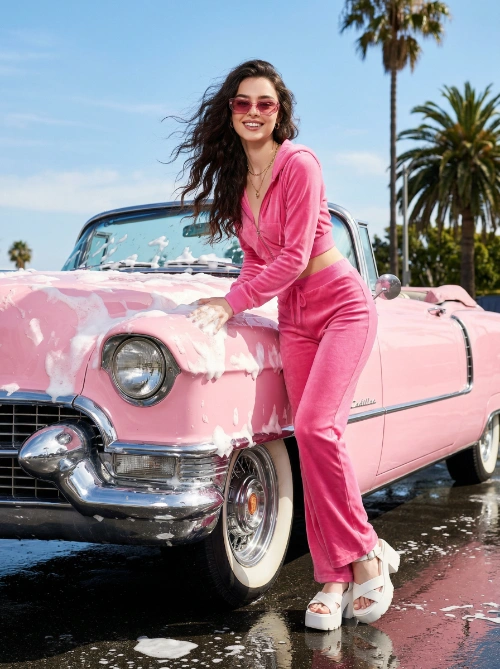
Y2K Retro Summer Drive
Core Concept Using the uploaded real female subject as the visual baseline, generate a high-fashion editorial image infused with Y2K retro aesthetics and strong visual contrast. The scene captures the subject in a summer outdoor setting, interacting with a pink vintage convertible covered in decorative foam, creating a lively, nostalgic, and fashion-forward visual narrative. Character Baseline and Styling Baseline: Strictly follow the facial features, structure, and personal aura of the subject in the uploaded image. Expression: Confident with a playful edge. Skin: Naturally radiant with a healthy glow. Physique: Well-proportioned and fit, with a natural forward-leaning posture. Hair: Long, dynamic wavy hair, gently lifted by a light breeze for a sense of motion. Outfit: Bright pink two-piece casual set paired with matching stylish sandals. Accessories: Fashion sunglasses, a delicate necklace, and minimal rings. Pose, Scene, and Lighting Pose: The subject leans naturally against the car, with both hands lightly touching the foam-covered surface. Scene: Bright outdoor setting featuring a pink vintage convertible coated in decorative foam as the central prop. Environment: Slightly wet ground reflecting ambient daylight, creating natural reflective highlights. Lighting: Bright natural sunlight producing balanced highlights and shadows, enhancing contrast and dimensionality. Color Palette: Dominant pink tones complemented by blue sky and white foam, forming a harmonious and vibrant color scheme. Atmosphere: Playful, nostalgic, and stylish. Composition, Quality, and Style Composition: Eye-level perspective with a slightly wide-angle feel. Technical Settings: Aperture at f/4.0 to maintain clarity across the frame. Image Quality: High-detail photorealism with strong emphasis on material textures and light behavior. Visual Style: Y2K-inspired retro fashion with cinematic storytelling.
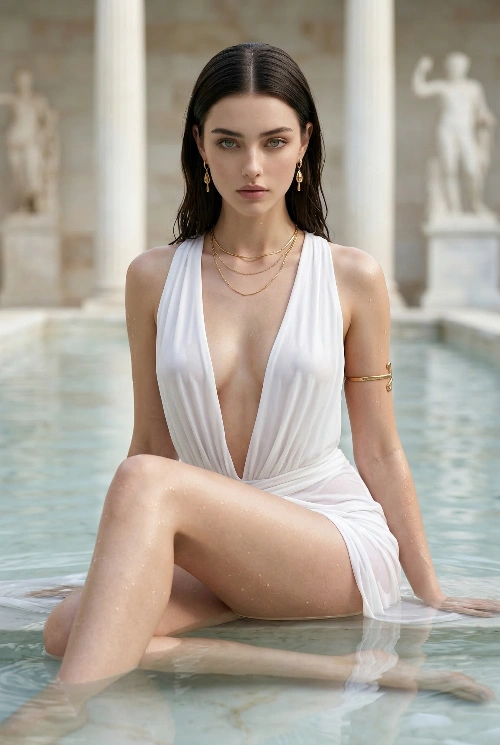
Dominant High-End Fashion Portrait
GLOBAL STYLE & QUALITY Ultra-high-end hyper-realistic fashion photography, cinematic editorial realism, natural optics, physically correct lighting, real skin micro-detail, zero stylization, zero CGI, zero illustration, no anime, no fantasy look, pure photographic dominance FACE Cold, controlled, dominant feminine face Sharp symmetrical features, porcelain skin with subtle warmth Eyes locked directly into the camera with predatory calm No smile, lips relaxed and closed — expression communicates “I am untouchable” Makeup minimal but sculpted: emphasis on eyes and bone structure BODY Elegant yet powerful feminine physique Strong posture despite relaxed pose Torso slightly forward, hips grounded — ownership of space Pose radiates confidence, not invitation Sex appeal comes from authority, not softness SKIN Fair luminous skin with realistic wet sheen Natural highlights from water on thighs, hips, and waist No artificial glow, no plastic smoothness Subtle contrast between dry upper skin and water-kissed lower body HAIR Long straight hair, dark roots transitioning to lighter ends Hair slightly damp near ends Clean parting, controlled flow No wind drama — calm, intentional presence CAMERA & ANGLE Medium-close to mid-body shot Camera positioned slightly below chest level Angle creates power imbalance in favor of subject Lens realism (85mm editorial look), shallow depth of field SETTING Ancient marble pool with pale stone architecture Classical columns and sculptural forms in background Bright daylight with soft diffusion Background clean, majestic, and secondary to subject SCENE SETUP Subject seated in shallow water One leg bent, one leg extended forward Waterline wrapping around thighs and hips Upper body upright, stable, unshaken She does not react to environment — environment submits to her presence OUTFIT (CRITICAL – IMAGE MATCH) White deep-V draped dress / swim-dress hybrid Fabric thin, flowing, soaked at lower half Deep plunging neckline emphasizing chest without exaggeration Dress clings naturally to body due to water weight Gold jewelry: • Elegant drop earrings • Fine layered gold necklaces • Gold arm cuff on upper arm No extra accessories, no modern clutter PROPS (FLATLAY FEEL) None — power is self-contained Jewelry acts as status markers, not decoration EXPRESSION & MOOD Aggressive elegance She is not seductive — she is commanding Mood feels calm, dangerous, superior Viewer feels observed, not invited Sexiness emerges from control and dominance ATMOSPHERE Bright but controlled daylight Soft shadows carve collarbones, shoulders, and thighs Water reflections subtly dancing on skin Clean exposure, no blown highlights FINAL RESULT GOAL A hyper-realistic, aggressively dominant BOLD portrait Feels like a luxury power-myth — goddess without fantasy No softness, no cuteness, no playfulness Pure authority, composure, and sexual confidence Indistinguishable from a high-budget editorial fashion photograph
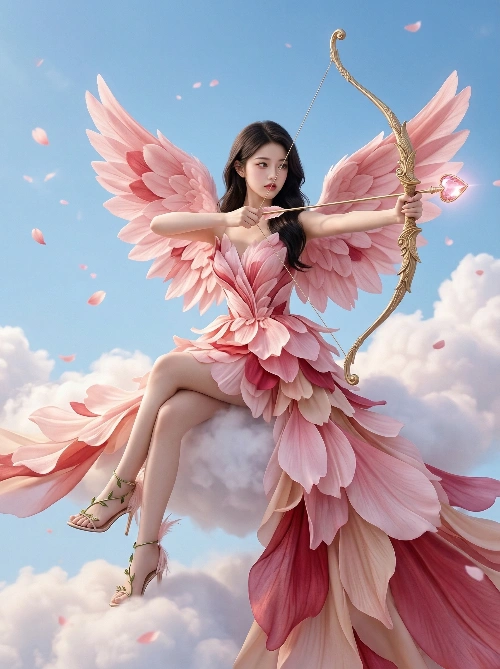
Ethereal Cupid Fashion Port
Using the real female subject you uploaded as the visual baseline, generate an ultra-high-precision photorealistic portrait that blends fantasy storytelling with high-fashion aesthetics. The character is reimagined as a modern Cupid, poised elegantly among the clouds, creating a visual spectacle that is ethereal, dramatic, and fashion-forward. Character Baseline and Styling Baseline: Strictly follow the facial contours, proportions, skin texture, and overall aura from the reference image. Age and ethnic characteristics must remain consistent with the original. Expression: Enhanced soft-glow makeup that remains faithful to her natural features. Expression is focused, with sharp, intent eyes suggesting precise aim. Hairstyle: Fully replicate the hair color, length, texture, and natural form from the reference image. Wardrobe, Accessories, and Pose Main Dress: A fantasy-inspired haute couture gown. Design: Structured, intricately detailed strapless bodice with a long, flowing train. Material: Constructed from layered, realistic soft pink cherry blossom petals, creating a light, semi-transparent, airy effect with clearly defined petal textures. Color: Dominated by soft sakura pink, blended with crimson and nude pink in a natural gradient. Wings: Large petal wings composed of countless cherry blossom petals arranged in a dimensional collage, transitioning naturally from pale pink to near-white. Each petal must exhibit realistic texture and light transmission. Footwear: Ultra-thin high-heeled decorative sandals, wrapped with vines and petals, accented with white feathers. Weapon Accessory: Holding an ornate gilded longbow with intricate engravings. The arrow tip is set with a heart-shaped gemstone, emitting a soft pink-gold glow. Pose and Composition Pose: The subject sits gracefully atop a fluffy cloud. The right leg is bent for support, while the left leg extends forward. The upper body leans slightly forward as she draws the bow, combining elegance with controlled strength. Composition: Medium shot with the subject centered in the frame, wings fully extended. Eye-level perspective. Sharp focus on the face and bow, with the surrounding clouds slightly softened. Environment and Lighting Environment: Suspended in a bright sky, seated on voluminous clouds. The background features a vivid blue sky with scattered floating cherry blossom petals, creating a dreamy, weightless atmosphere. Lighting: Soft directional diffused lighting. The key light from above at an angle defines the silhouette, complemented by fill light to maintain clean shadows. Light creates crystalline highlights on gemstones, metal surfaces, and petals, resulting in an airy yet dimensional tonal quality. Style and Texture Visual: Photography-grade hyperrealism with cinematic impact and extreme detail fidelity. Detail: Supports 8K-level rendering. All materials—skin, petals, metal—must achieve high physical realism. Fusion: Seamlessly combines high-fashion aesthetics, mythological drama, and romantic fantasy imagination. Quality: Achieves the clarity, color depth, and visual impact of top-tier commercial fashion campaigns.